Is It Worth Repairing a Printer? The Expert Guide for Small Offices
It starts with a simple paper jam or a faint streak on a page, and suddenly, your office productivity comes to a grinding halt. Every small business owner eventually faces the same frustrating dilemma: Do I pay to fix this “old faithful” machine, or is it time to cut my losses and buy something new?. Making the wrong choice can lead to a cycle of “throwing good money after bad,” or wasting thousands of dollars replacing a machine that only needed a minor part.
The Financial Tipping Point: Applying the 50% Rule
When a machine breaks down, your first instinct is usually to call for copier repair services to get things moving again. However, the very first thing an expert will tell you is to look at the repair quote and apply the “50% Rule”.
Understanding the 50% Rule
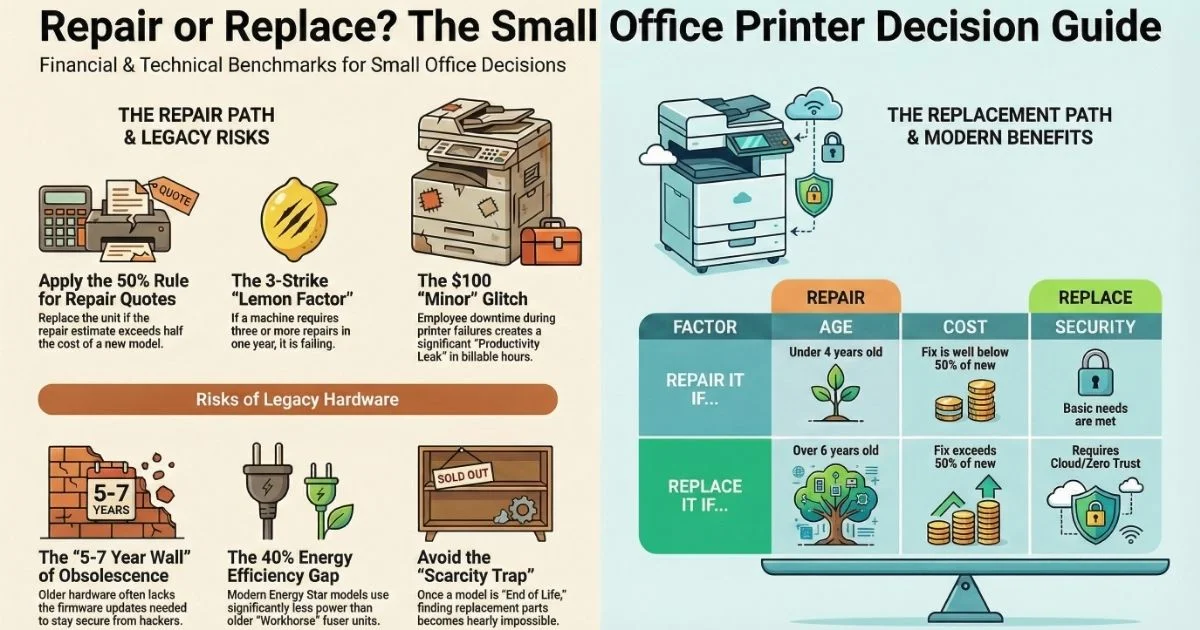
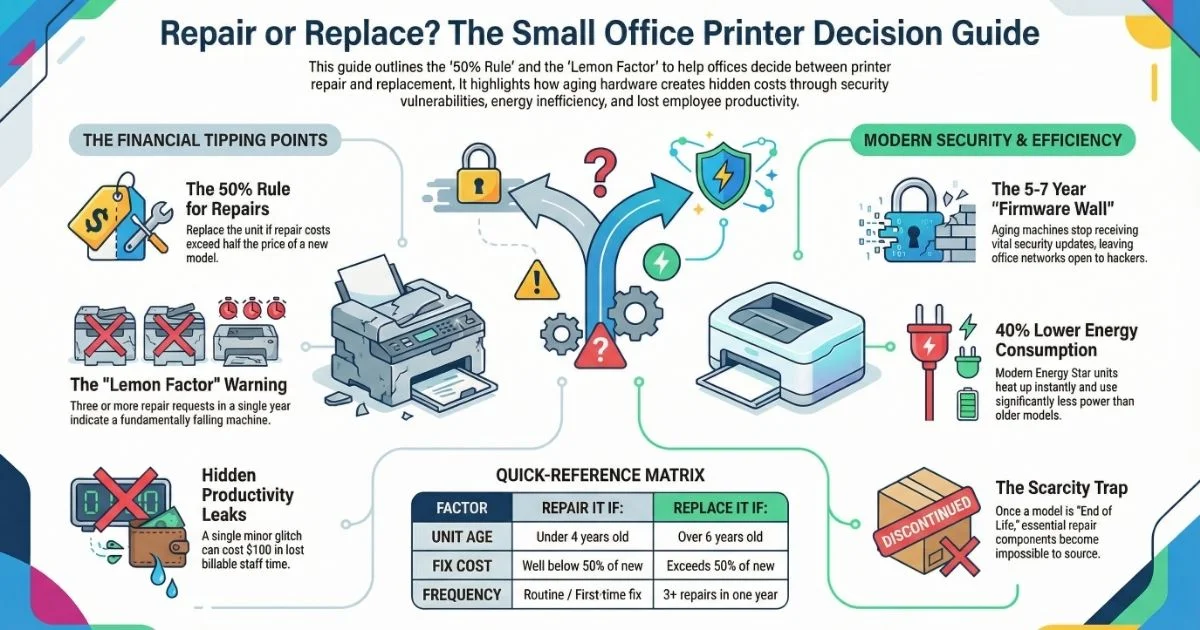
The rule is straightforward: If the estimate for your copier machine repair (including parts and labor) is more than half the cost of buying a brand-new, comparable model, you should stop. Investing that money into a dying machine is often like putting brand-new tires on a car with a broken engine.
Why Starting Fresh Often Wins
- Fresh Warranty: A repair usually only guarantees the specific part fixed, whereas a new machine comes with a full factory warranty.
- New Supplies: New printers often come with a full set of toner, effectively paying for part of the upgrade cost.
Navigating the “5-7 Year Wall” of Obsolescence
Modern printers are essentially networked computers that happen to have motors. When you are considering copier repair services, the age of the machine is just as important as the physical problem.
The Firmware and Security Barrier
Most office machines hit a “5-7 Year Wall”. Even if a mechanical repair makes your 7-year-old machine run like new, it may hit a “Firmware Wall” where the manufacturer stops releasing vital security updates, leaving your network wide open to hackers.
Software and Connectivity Mismatch
Often, a repair is requested because a machine “won’t scan” or “won’t connect,” but the issue is that the old hardware inside can no longer “talk” to modern Windows or Mac operating systems.
Identifying the “Lemon Factor” and Recurring Failures
Every piece of equipment eventually needs a tune-up, but there is a big difference between routine maintenance and a fundamentally failing machine.
The Three-Strike Warning
In the industry, we call this the “Lemon Factor”. A healthy, professional-grade machine should give you four to six months of trouble-free work between service visits. If you have requested repairs three or more times in a single year, you are fighting a losing battle.
The Chain Reaction of Failure
When a machine is overworked, internal parts begin to fail in a chain reaction. You might pay for a printer repair today, but because the internal gears are worn, that fix puts stress on the motor, which then fails shortly after.
Uncovering Hidden Costs: Toner and Energy Efficiency
The most expensive part of an old printer often isn’t the repair bill—it is the ongoing cost of the ink and toner. Older technology is simply less efficient and often wastes more toner during “cleaning” and “charging” cycles.
The Efficiency and Energy Gap
Older fuser units require a massive amount of heat to bond toner and stay “warmed up” even when idle, pulling constant power from your wall. Modern Energy Star-rated machines heat up instantly and use up to 40% less energy than models from a decade ago.
Operational & Energy Cost Comparison
| Cost Factor | Older “Workhorse” Models | Modern 2026 Replacements |
| Cost Per Page (CPP) | High due to waste and supply hikes | 20% to 30% Lower |
| Energy Consumption | High (constant fuser heat) | Up to 40% Lower |
| Supply Efficiency | Expensive, low-yield cartridges | High-capacity tanks (10k+ pages) |
Security Standards and the Scarcity Trap
In 2026, a printer is a powerful computer connected to your internal network. If your machine is over five years old, you are likely fixing a unit that puts your entire business at risk.
Legacy Security and Regulations
Most legacy machines lack modern encryption like TLS 1.3. If you work in healthcare (HIPAA) or finance (SOC2), keeping an old printer through multiple repair visits could lead to massive fines if a data breach occurs. Modern units feature “Zero Trust” security that automatically blocks suspicious traffic.
Hunting for “Ghost” Components
Once a manufacturer declares a model “End of Life,” they stop making the components needed to keep it running—a scenario known as the “Scarcity Trap”. If your technician tells you a part is on “backorder with no ETA,” it means the supply chain has dried up.
Calculating the Productivity Leak and Tech Gap
When a machine breaks, managers often only look at the repair invoice. However, the real cost is the “Productivity Leak” caused by your team standing around a broken machine instead of doing their jobs.
The “Wait Time” Math
If five employees each lose 30 minutes trying to fix a jam or waiting for a document, you have lost 2.5 hours of billable work. At an average staff cost of $40/hour, that single “minor” glitch just cost your company $100 in lost time.
Workflow Features of 2026
- Scan-to-Cloud: Modern units send documents directly to Google Drive, Dropbox, or OneDrive.
- Auto-Redaction: Machines can automatically “black out” sensitive information like Social Security numbers while scanning.
- Mobile Printing: Your team can print directly from their phones without needing to sit at a desk.
The Final Verdict: When to Repair or Replace
Deciding between copier repair services and buying a new machine ultimately comes down to whether your office equipment supports your success or acts as a source of anxiety.
Repair vs. Replace Decision Matrix
| Condition | Repair It If: | Replace It If: |
| Age | Under 4 years old | Over 6 years old |
| Financials | Fix cost is well below 50% | Fix cost exceeds 50% rule |
| Frequency | Routine/first-time fix | 3+ repairs in a single year |
| Capabilities | Meets basic office needs | Lacks modern security/Cloud |
Upgrading to a new unit gives you the “Peace of Mind” that your business stays open and professional, no matter how big the deadline is. By choosing reliability over “quick fixes,” you are choosing to keep your office moving forward.